
Why Happen CDR & How to Reduce CDR in Huawei Telecom Network?
Call Drop Rate (CDR) is a key performance indicator (KPI) in telecommunications that measures the percentage of calls that are prematurely terminated due to technical issues, rather than being ended by the user. In a Huawei network, a high CDR indicates poor network quality, usually stemming from radio issues, hardware failures, or, during VoLTE, handover problems.
Here is a detailed breakdown of why CDR occurs and how to reduce it in a Huawei network.
Why High CDR Occurs in Huawei Networks?
The root causes of high call drop rates can be classified into several main categories:
Coverage Issues (Radio Link Failure – RLF):
Weak Signal/Coverage Holes: Inadequate coverage in areas (like indoor or rural areas) causes RSRP (Reference Signal Received Power) to fall below usable levels.
Pilot Pollution/Overlapping Cells: Too many cells covering a single area can cause high interference.
Interference (High Noise Floor):
Downlink/Uplink Interference: High interference (low SINR – Signal to Interference plus Noise Ratio) on a frequency, especially in densely populated areas, leads to poor voice quality and drop.
Inter-modulation Interference: Self-excitation of the carrier board or antenna.
Handover Failures (HOSR):
Missing Neighbors: If a neighbor relation is missing, a user moving between cells cannot switch, causing the call to drop when the signal dies.
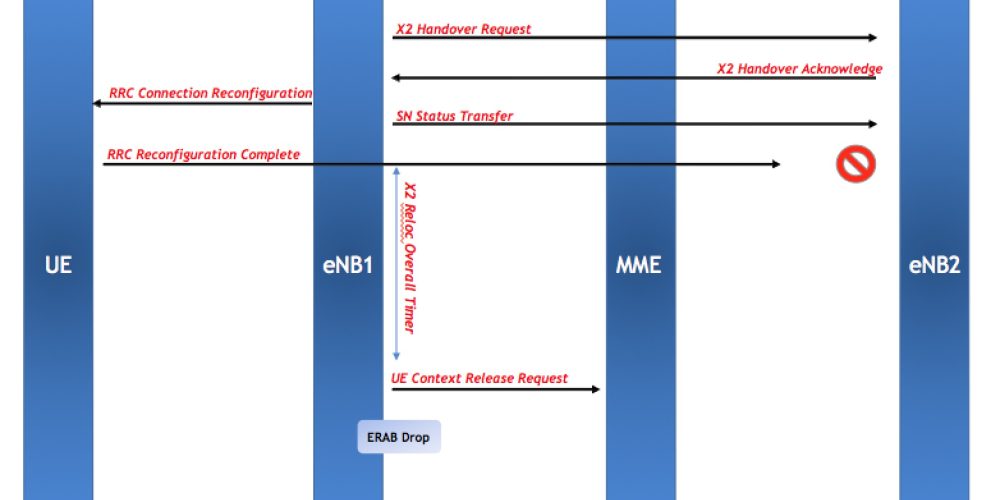
Wrong Handover Parameter Settings: Handover triggered too late or too early (e.g., T304 timer expires).
Over-shooting Cell: A cell covers too large an area, causing users at the edge to not handover in time.
Hardware Faults:
Faulty RF Modules/TRX: Malfunctioning base station hardware (e.g., RRU/GRFU/CU).
High VSWR (Voltage Standing Wave Ratio): Damaged antennas, connectors, or jumpers causing signal degradation.
Network Congestion:
Too many users overloading a cell during peak hours.
Parameter Misconfiguration:
Radio Link Timeout (RLT): Set too low in 2G, making the system release calls too quickly.
UE Inactivity Timer: If set too small, calls are dropped while still active.
How to Reduce CDR in Huawei Networks?
Reducing the CDR involves a mix of physical, radio, and parameter optimization techniques:
1. Optimization of Coverage and Coverage Holes
Adjust Antenna Tilt: Lower (downtilt) or raise (uptilt) the antenna to reduce overshooting and fix holes.
Optimize Azimuth: Adjust the direction of the antenna.
Add Sites/Repeaters: Install more sites to cover weak areas or indoor distribution systems (IBS).
2. Interference Reduction
Frequency Retuning: Re-tune or change the frequency, particularly the BCCH/TCH frequency in 2G networks, to mitigate interference.
Power Control Settings: Optimize uplink/downlink power control to maintain a good signal-to-noise ratio.
Check for External Interference: Identify if external sources (like jammers or broken boosters) are affecting the frequency.
3. Handover Parameter Optimization (Huawei Specific)
Neighbor Cell Optimization: Ensure no missing neighbors and maintain complete, accurate neighboring cells.
Increase Handover Margins: Adjust parameters like InterratcsThd2Decn0 (3G to 2G handover) or A3Offset (4G intra-frequency) to ensure timely handover.
Adjust 2D/2F Parameters (3G/4G): Modify thresholds for inter-RAT handovers (moving from 3G to 2G or 4G to 3G/2G).
Optimize N310/T310 Parameters (4G/5G): Increase the N310/T310 values (PDCCH decoding failures) to prevent premature call drops.
4. Hardware Maintenance
Check VSWR: Regularly monitor VSWR alarms and fix antennas, feeders, or jumpers.
Module Replacement: Identify faulty modules (e.g., RRU) by swapping them with neighboring cells.
Check Clock Synchronization: Ensure the BTS/NodeB/eNodeB clock is running normally.
5. Capacity Expansion
Add Channels/Carriers: If drops are caused by congestion, expand the capacity of the cell (e.g., adding a new TRU in 2G or adding a new band in 4G).
Quick Troubleshooting Check List (Huawei)
Check for high VSWR alarms, then fix it.
Check for high interference (Low SINR) and clean the frequency.
Check missing neighbors via MML (Mod Neighbor).
Run a drive test to analyze the call flow, specifically the RRC release reason.
Check for hardware failure on the BBU/RRU.